Step into the heart of your projects with an immersive virtual environment where you can explore, make informed decisions, and collaborate seamlessly.
VIVOA™ turns real-world sites into fully explorable digital environments that teams can inspect, document and compare from anywhere. It is designed for multiple use cases such as dilapidation surveys, safety walks, construction progress tracking, insurance documentation, client site visits, and more.
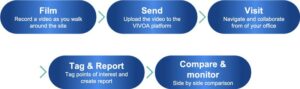
How VIVOA™ works in 5 steps
Step 1 – Film: Capture the real site
Start by walking the site once, filming as you go with your usual device or a recommended 360° capture kit. The focus is on a natural, uninterrupted walkthrough that follows your standard inspection route, so there is no need for specialist operators or complex setup.
As you move, VIVOA™ captures every corridor, room, facade and access point, preserving the true condition of the environment at that specific moment in time. This creates a visual audit trail that can later support technical assessments, contractual discussions, regulatory checks or claims documentation.
Step 2 – Send: Upload and process securely
After filming, simply upload the video to our secure VIVOA™ platform from the office or directly from the field. The system is built to accept large files and unstable connections, allowing uploads to resume if interrupted and ensuring your data reaches the platform reliably.
Once uploaded, the video is automatically processed into an immersive visit, with scenes optimized for smooth navigation and clear visual quality. The heavy lifting is fully handled in the background, so users only see an intuitive interface when they log in, regardless of the original recording complexity.
Step 3 – Visit: Explore remotely with full context
Users log into VIVOA™ through a web browser and step into the virtual visit, moving along the recorded path as if they were physically on site. They can look around freely, zoom into details, pause at critical points, and jump to key areas using visual cues or predefined waypoints.
This digital visit makes remote collaboration practical: engineers, surveyors, project managers, clients and regulators can all inspect the same captured reality without attending a physical site meeting. Travel time and associated costs drop sharply, while decision cycles accelerate because everyone can see the same evidence-rich environment.
Step 4 – Tag & Report: Turn visuals into structured insight
During the virtual visit, users can pause the view and tag observations directly in the scene—issues, defects, risks, temporary works, access constraints, completed elements or points of interest. Each tag can include structured fields such as category, severity, status, assigned, due dates and freeform notes to match existing workflows.
These annotations are anchored to precise visual locations, making it clear exactly what is being referred to and removing ambiguity that often arises from text-only reports. From there, VIVOA™ compiles the tagged information into exportable reports that can be shared with contractors, clients or authorities, ensuring clear communication, traceability of decisions and a consistent record over the life of the asset or project.
Step 5 – Compare & Monitor: Track change over time
Every captured visit is stored as a dated snapshot, allowing users to open multiple sessions side by side and compare the same spot at different moments. By moving synchronously through two or more timelines, teams can see what has changed—new elements built, defects repaired, temporary works removed, or new risks introduced.
The comparative view supports powerful use cases: validating contractor progress claims, documenting pre- and post-works conditions for dilapidation, demonstrating compliance to regulators, or reviewing safety improvements after interventions. Over time, VIVOA™ becomes a visual history of the site, enabling evidence-based decisions, reducing disputes and giving all stakeholders confidence that what they see is a faithful representation of reality.
VIVOA delivers more than a digital inspection.
It provides a structured, repeatable, and collaborative workflow that improves situational awareness, reduces uncertainty, and turns on-site reality into actionable, long-term insight.
Key benefits:
Time & Cost Savings
Fewer physical visits, faster reviews, and reduced disruption to operations.
Quality & Consistency
Repeatable workflows across sites and teams ensure reliable outputs.
Transparency & Trust
A shared visual source of truth minimizes disputes and accelerates decisions.
Compliance & Auditability
Time-stamped, tagged evidence supports safety, quality, and contractual obligations.
Faster Turnaround
From capture to report in hours, not days